Clarius Handheld Ultrasound Extended Use: A Setup Audit
Same symptom on your system?
Tell us your model and what it is doing. A GEPROBE engineer replies with a diagnosis path, part options and pricing — usually within 6 hours, with no obligation.
Chat on WhatsApp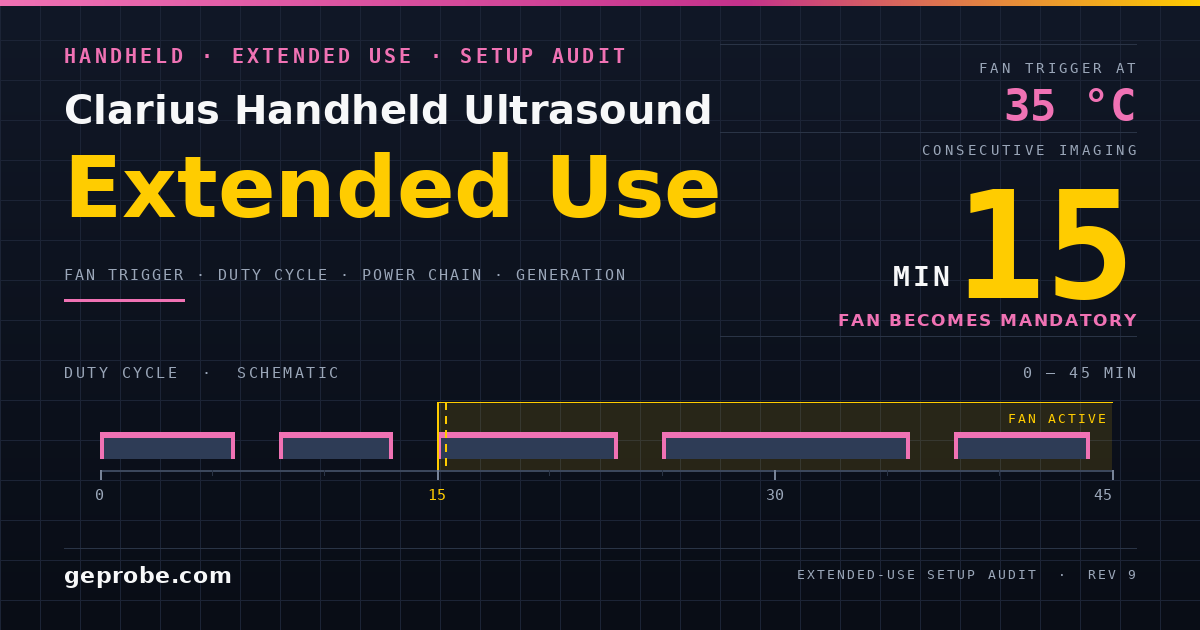
Clarius handheld ultrasound extended use is a kit discipline before it is an imaging question. The scanner keeps producing a usable image while the conditions around it drift.
The first visible symptom is rarely the condition that caused it.
This audit is ordered for whoever signs the setup off: clinical engineering, procurement, or the sonographer who owns the teaching day. Each section produces an artefact you can attach to the job record.
Scope: checked against the Clarius Scanner HD3 manual, document 15-03-00118, revision 9, read 2026-11-20. Figures move between revisions — see the revision section before quoting any page.
Classify the fault domain before you reopen the accessory box
Three domains get confused in one conversation: heat, power, and a kit assembled from mismatched generations. Each has a different cheapest test, and each test leaves different evidence.
| What you actually saw | Domain | Cheapest discriminating action | What it establishes |
|---|---|---|---|
| Frame rate falls away seconds after you stop | Neither — designed idle behaviour | Move the probe and watch for the return | The documented idle ladder opens at three seconds, before any thermal event |
| Image freezes, then idles, then powers off untouched | Designed idle ladder | Time each step against the sequence | Whether the unit was idle or died mid-imaging |
| Fan stationary on a cool scanner | Thermal control, working | Warm toward the documented activation point first | The manual ties fan activation to a scanner temperature, not to the exam |
| Charge never starts through the fan | Power | Cable, then wall supply, then charging route | Which single link fails |
| Fan seats poorly, or no charge route exists | Generation mismatch | Read the scanner label against the fan catalogue number | Whether the parts are one generation |
The first two rows close most "performance" complaints without a part being ordered. A frame-rate drop on an untouched scanner is the documented conserving behaviour, not a fault (rev 9, p. 25).
Run the arithmetic on your own numbers
Two thresholds govern a long session, and they are not the same threshold.
The fan becomes mandatory once a single imaging stretch passes fifteen consecutive minutes (rev 9, p. 25). Separately, the fan activates when the scanner reaches 35°C (rev 9, p. 32).
That gap is usable. Time the scanner from cold start to 35°C in the room and mode you actually work in. If it gets there in under fifteen minutes, the room is your binding constraint and the fan rule is not what limits you.
The battery sets the second limit: roughly 45 minutes of typical scanning, and about 1.5 hours to charge from empty (rev 9, p. 30).
blocks_per_pack = floor(typical_scan_min / block_min)
wall_clock      = blocks_per_pack * (block_min + gap_min)
packs_per_shift = 1 + floor((shift_min - wall_clock) / recharge_min)
Worked with the manual's figures and a 15-minute cap: 45 / 15 gives 3 blocks, 3 x (15 + 5) gives 60 minutes of wall clock, and 1 + floor((480 - 60) / 90) gives 5 packs. That is about fifteen imaging blocks in an eight-hour shift.
Assumptions, labelled: the 5-minute cooling gap is a site assumption, not a manual figure. Recharge uses the manual's 1.5 hours. One scanner, no second pack, fifteen-minute rule as the governing cap.
What a label and a catalogue number can prove
A pre-session check is worth running only if each line yields evidence instead of a tick. Take these in order.
- Scanner label: exact model string. Revision 9's environmental table names C3, C7, EC7, L7, L15, L20, PA and PAL HD3 units (p. 69).
- Fan assembly: the Power Fan HD3 identifier, CIDN 50-02-00077 (p. 33).
- Cable: the removable cable, CIDN 10-18-00039 (p. 33).
- Charging route: the charger or the fan, and the manual names no third route (p. 33).
- Wall supply markings: 100–240 VAC in, 0.45 A at 50–60 Hz, 5 VDC 3.2 A out (p. 33).
- Charge evidence: scanner LED bands — red to 30%, orange to 65%, blue to 95%, green above (p. 34).
- Room conditions against the revision-9 limits in the next section.
What the check cannot prove matters as much. A fan's catalogue number says nothing about which scanner it will sit on, so a correct fan CIDN on the bench is not evidence of a matched kit.
A supply with the right rating is not an approved supply. The manual calls for a manufacturer-recommended unit and restricts charging to the two named routes (p. 33).
Quote the revision, not just the model number
A model name is a weak citation, because the same model carries different figures across revisions. Revision 9 tabulates these for the eight HD3 units in its table (p. 69).
| Condition | Operating | Transient | Storage and transport |
|---|---|---|---|
| Temperature | 0°C to 40°C | -20°C to 35°C | -20°C to 50°C |
| Humidity | 15% to 95% RH | 15% to 95% RH | 0% to 95% RH |
| Pressure | 620 hPa to 1060 hPa | not stated | not stated |
The transient column is footnote-bound: at least 20 minutes of operation once removed from a 20°C room, with the fan fitted, in B-mode and Eco mode (p. 69).
The charger table in the same revision leaves its transient column blank entirely (p. 69). Two consequences follow for a site document.
A page number is valid only for the revision you hold. And a claim that a charger tolerates a transient condition needs its own citation, because this table does not give one.
Field swap, supply swap, or return to the manufacturer
Sort the failure by what the manual documents, not by what looks like a module.
| Item | Documented handling | Practical route |
|---|---|---|
| Cable | Named as a removable cable (p. 33) | Site swap, then re-test the charge path |
| Wall supply | Rating stated, brand mandated (p. 33) | Replace with the recommended unit only |
| Fan assembly | Attach, remove, clean, disinfect documented (pp. 32–34) | Assembly-level swap; internals are not a site procedure |
| Handheld body | No user procedure documented in revision 9 | Return to the manufacturer or distributor |
| Built-in battery | Charge status only (p. 34) | Return path, not a site replacement |
Prices for any of these are quote-dependent, and I did not verify current figures, so the table deliberately carries none.
The decision that matters is the split. A cable or a supply is a same-day substitution. A fan assembly, the handheld body, or the built-in battery each consume a return cycle.
Where the bench ends, and the manufacturer begins
One boundary keeps the plan honest. The GEPROBE catalogue covers ultrasound parts across the major console brands (parts catalogue) — reviewed 2026-11-20.
That list is GE, Philips, Siemens, Samsung Medison, Mindray, Hitachi, Esaote, Canon Toshiba.
Clarius handheld accessories are not in that list, so a Clarius fan or charge-path question routes to the manufacturer or the distributor of record.
For the rest of a mixed fleet, the bench covers probes and parts.
That means free evaluation, a repair-or-replace quote against it, OEM-standard restoration, and a test report with a cosmetic checklist on return (repair services) — reviewed 2026-11-20.
Turnaround and warranty terms are confirmed per item at quotation, not assumed from a page.
Keeping the two lanes separate is what stops a handheld accessory check being written into a console repair file.
A record that survives a bad shift
Log by fault domain, because a domain-tagged record routes itself. For each event capture the domain you assigned, the observation that assigned it, the action taken, and what the action proved.
Add the four session facts a reviewer will ask for: model and serial from the scanner label, the fan and cable identifiers, the charging route used, and the room temperature at the time.
Revision 9 documents status lights and charge-band indications, so write down what the unit showed rather than a remembered summary (p. 34).
A record that says "overheated" is unactionable. A record that says the scanner idled at the documented intervals and shut down after fifteen minutes untouched describes a design behaviour, and it closes the ticket without a part.
Sources
- Clarius HD3 manual 15-03-00118 rev 9 (PDF) — reviewed 2026-11-20. Pages used: idle ladder and duty rule (p. 25); battery endurance (p. 30); fan activation (p. 32).
- Same manual — fan components and electrical specification (p. 33); charging routes, charge bands and EMS restriction (p. 34); environmental limits (p. 69).
- GEPROBE repair services — reviewed 2026-11-20. Free evaluation, repair-or-replace quoting, OEM-standard restoration, test report and cosmetic checklist.
- GEPROBE parts catalogue — reviewed 2026-11-20. Brand scope of stocked and repairable parts.
- GEPROBE — reviewed 2026-11-20. Company scope: medical equipment sales and repair services.
Related Articles

Cross-Border Ultrasound Probe Repair: A Verification File
Which unit ships, what the round trip really costs, how to verify a returned probe with no spare, and who signs it back into clinical use.
3D Ultrasound Export: Volume, Cine, or Probe Record
A 3D ultrasound export judged by byte arithmetic, plane spacing and destination pairing — and what the volume proves about the probe.
Ultrasound QA Baseline Drift: Triage Before You Repair
Ultrasound QA baseline drift, worked in order: a measured noise floor, a one-session swap design, a cost threshold, and what a clean image cannot prove.